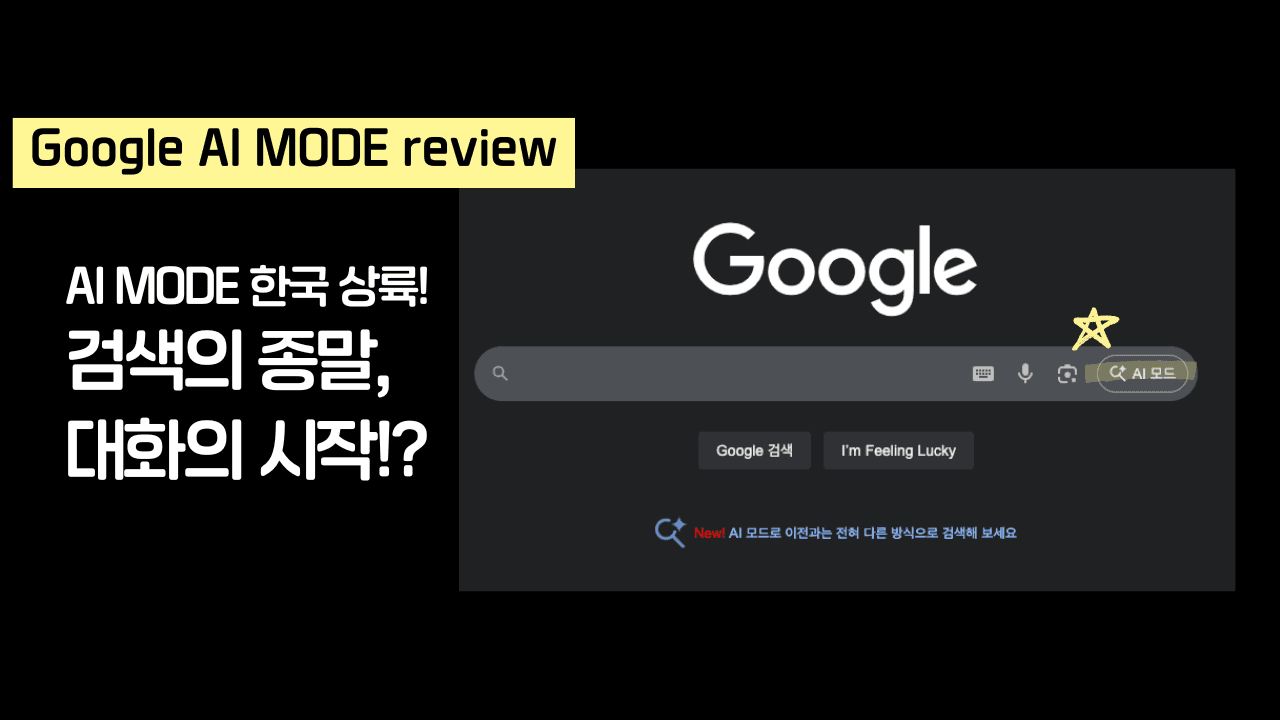
AI Summary
Google AI mode is a next-generation search system that goes beyond keyword searches by understanding user intent and generating conversational responses. Through query fan-out and real-time search, it provides comprehensive and up-to-date information for complex questions, revolutionizing the search experience. As a result, searching is shifting from a link exploration focus to obtaining answers through conversations with AI.
Google AI Mode: The End of Search and the Beginning of a New Conversation
On September 9, 2025, I spent a sleepless night imagining the future of search. When the official launch of Google AI Mode in Korea was announced, I knew it wasn't just a feature update. It was a monumental turning point, signaling the end of the familiar era of keyword-based search and ushering in an era of deeply interactive search powered by artificial intelligence.
Now, instead of searching through fragmented information, we will experience a completely new experience: asking questions and gaining insights as if we were talking to a capable assistant. At the heart of all this innovation lies Google's latest AI model, "Gemini 2.5 Custom Version," further enhancing its reliability and potential.
What is Google AI Mode?: The Beginning of Next-Generation Search
Google AI Mode is attracting attention as a "next-generation search system," going beyond a simple search engine improvement. Conventional search methods required users to manually click through multiple webpages to find the information they were looking for, and manually collate and organize scattered information, which was cumbersome. However, Google AI Mode overcomes these limitations, identifying the "true intent" behind a user's complex query and providing in-depth, comprehensive answers, as if they were experts in the field.
At the heart of this innovative feature is a technology called " Query Fan-out ". Query fan-out intelligently decomposes a single, complex query entered by a user into multiple, detailed subqueries. These subqueries then undergo a simultaneous search process to gather the necessary information. The vast and in-depth data obtained during this process is then organically synthesized into a single, complete answer. This goes beyond simply summarizing or listing webpage content. It's the ability of AI to construct a logical flow and "create" the most appropriate response to a user's question.
Key Features of AI Mode and Real-World Reviews: Experience Amazing Answer Generation Like a Barista, Like an Expert
Comprehensive Answers to Complex Questions: The Magic of Systematic Information Organization
Google AI Mode goes beyond simply listing fragmentary information about keywords. It accurately understands a user's complex intent and provides expert-level insights and systematic information, much like a barista's thorough knowledge of various coffee beans and brewing methods. For example, in response to a question like "Give me a comparison chart of various coffee brewing methods," AI provides a clear overview of the characteristics, flavors, and preparation times of major brewing methods.
Average
Brewing Method | Features | Taste and Aroma | Preparation Time | Difficulty |
|---|---|---|---|---|
Espresso | Concentrated extraction in a short time using high pressure | Intense and rich body, rich crema | Very fast | Normal |
Drip (Hand Drip) | Brewed by adding coffee grounds to a filter and pouring hot water over it | Smooth and clean taste, with a variety of flavors Flavor | Average | Easy |
French Press | Brewed by steeping coffee grounds in water, then filtered | Dark and rich body, with possible presence of fine coffee grounds | Average | Easy |
Moka Pot | Brewed using steam pressure generated by heating the lower water tank | Between espresso and drip, rich and nutty | Average | Average |
In this way, AI mode aggregates and analyzes information from multiple sources, helping users quickly understand the core content they need with expert depth. Just like an experienced barista recommending the perfect coffee to suit a customer's preferences.
Multimodal AI that understands images: Complete analysis of visual information as well
It's not limited to textual information. Google AI Mode analyzes and explains information in user-uploaded photos like an insightful expert, utilizing a multimodal search function that combines images and text. Through close integration with Google Lens, you can instantly answer questions about objects or landscapes right in front of you. If you upload a photo of a Seoul cityscape and ask, "Describe the characteristics and atmosphere of this place," the AI will respond with the following:
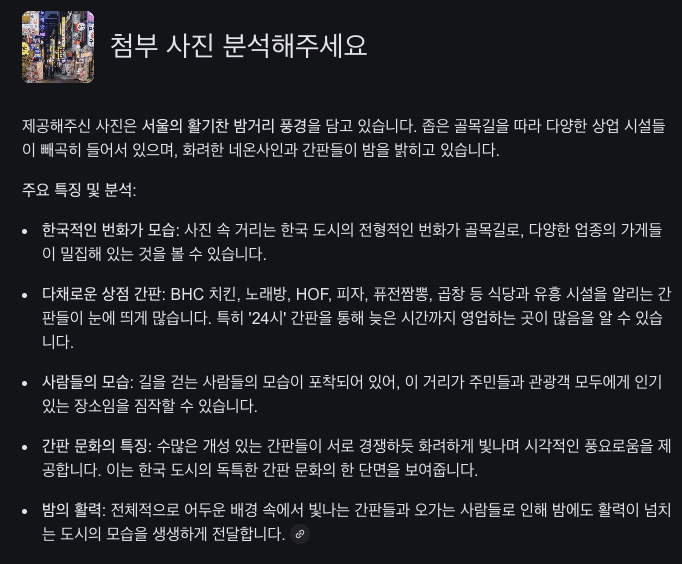
The photo you provided captures a vibrant nighttime scene in Seoul. Narrow alleyways are lined with various commercial facilities, and bright neon signs and billboards illuminate the night. ... The street in the photo is a typical bustling alleyway in a Korean city, densely packed with shops of various industries. Signs advertising restaurants and entertainment venues, such as BHC Chicken, Karaoke, HOF, Pizza, Fusion Jjamppong, and Gopchang, are noticeably numerous. Signs with "24 Hours" in particular indicate that many establishments are open late. The presence of pedestrians suggests that this street is popular with both locals and tourists.
In this way, AI Mode goes beyond simply recognizing images; it understands and explains the cultural and social context within them, enriching the way users interact with the world. It's like a professional guide providing explanations, supplemented by knowledge of space and history.
The Unrivaled Competitiveness of Google AI Mode
Google AI Mode boasts unparalleled competitiveness among AI services currently available on the market. Unlike paid services like ChatGPT Plus and Claude Pro, which cost around $20 per month, the fact that it's completely free is a significant advantage in terms of user accessibility. It offers revolutionary value by allowing users to experience the latest AI technology without incurring a financial burden.
Real-time Web Search to Reflect Up-to-Date Information
Google AI Mode doesn't rely on simple training data. It features a built-in real-time web search function, always reflecting the latest information to generate answers. This means it can deliver the most accurate and timely results in a rapidly changing information landscape.
Outstanding Korean Support Quality
Among its diverse language support, Google AI Mode boasts particularly outstanding Korean support quality. It accurately understands the subtle nuances and context of the Korean language and generates natural answers, providing an optimized experience for Korean users.
Information Accessibility Unaffected by Controversy over Naver Blog AI Crawler Blocking
Despite the recent controversy surrounding the "Naver Blog AI Crawler Blocking," Google AI Mode continues to provide relevant information by citing the latest Naver Blog content. This is because it leverages AI-trained crawlers and the vast data collected by "Googlebot." This case clearly demonstrates that Google's decades of accumulated web data remains a powerful competitive advantage in the AI era.
Enhancing Reliability with Clear Source Citation
All answers provided clearly display links to the websites that provide the information. This helps users easily verify the original source of information and significantly increases the reliability of answers.
Tips for maximizing Google AI Mode
The more complex the question, the better it shines
Google AI mode goes beyond simple searches to provide comprehensive and systematic answers to questions that require multiple factors, such as product comparisons or complex travel plans. The more specific and complex the question, the more sophisticated and useful the AI can derive. For example, try the following:
Plan a two-night, three-day trip from Seoul to Busan via KTX. Recommend budget-friendly accommodations near Haeundae Beach, and plan a trip to Gwangalli Beach on the first day and Gamcheon Culture Village on the second.
Such detailed questions can even be applied to complex requests, such as "Training plan and precautions for a triathlon next May."
Continue the conversation with follow-up questions
AI mode goes beyond simply providing information; it provides the ability to delve deeper into the information, much like a human conversation. If you have any questions or need more information based on the initial question, feel free to continue the conversation with follow-up questions. For example, after receiving a response, you can ask a follow-up question like this:
Tell me more
You can also ask for more detailed explanations of specific points or information from different perspectives.
Combine Images and Text
Beyond text-only questions, using images can maximize the utility of AI mode. Attach photos of specific objects, locations, or documents containing complex information to enrich your questions. For example, try using it in the following scenarios:
Recommend the three spiciest dishes at this restaurant along with a photo of the menu.
You can also use it in various ways, such as taking a photo of a bag you like and asking, "Show me other styles similar to this one," or taking a photo of a landmark and asking, "Tell me the history of this building and its opening hours."
How to Experience It Now
Easily experience AI search through your web browser or Google app, without any separate application! Anyone can easily get help from AI by following the simple steps below.
Access Google: Open a web browser or the Google app and enter your search query.
Select the 'AI Mode' tab: Click the 'AI Mode' tab next to the 'All' and 'Images' tabs at the top of the search results page. AI-generated, personalized answers will appear immediately.
If you don't see the 'AI Mode' tab at the top of the search results, don't panic! Click the flask icon (🔬) in the top right corner, and then select 'Enable AI Experiments' to enable the feature. This feature may still be in beta, but it's incredibly polished, so don't hesitate and try it out now!
For more information, please refer to the official guide on how to enable and use Google AI Mode: .
What you need to know: Experimental limitations and privacy
GOOGLE AI MODE is currently in the experimental phase . This may result in occasional delayed responses or inaccurate information.
Also, all search history is stored in your Google Account. This includes user activity data, such as search terms, visited websites, and voice commands. The collected data is used to improve and personalize services, as well as to train and develop AI models like Gemini.
This may raise privacy issues. Regarding this, Google states that you can directly control data collection through your account's Privacy Checkup and review and delete stored records at any time. For more information, please refer to the following links: Google Privacy Policy and Gemini API Data Processing Policy 。
A new search begins with a conversation
Like the message, "The end of search, the beginning of conversation," we have entered an era where we no longer have to endlessly click links to find what we're curious about, but rather engage directly with AI to quickly and accurately obtain the answers we truly need. AI mode understands your intent from the moment you ask a question and provides the optimal information, delivering a natural and efficient search experience, just like talking to a competent assistant.
ajig AI modeuleul gyeongheomhaeboji anh-eusyeossdamyeon, jigeum balo gugeul-e jeobsoghayeo saeloun geomsaeg-ui jipyeong-eul yeol-eoboseyo. web beulaujeona Google aeb-eseo geomsaeg-eoleul iblyeoghan hu 'AI modeu' taeb-eul seontaeghaneun geosman-eulo i hyeogsinjeog-in gineung-eul jigjeob cheheomhal su issseubnida. AIwaui daehwaneun dangsin-i chajdeon balo geu haedab-eul jegonghal geos-ibnida。 han beon sseobomyeon, dasineun yejeon geomsaeg-eulo dol-agagi eolyeobseubnida。
Chainshift Hana © 2025 ChainShift. All rights reserved. Unauthorized reproduction and redistribution prohibited.
자세히 386 / 5,000
If you haven't tried AI Mode yet, visit Google right now and discover a new horizon in search. Simply enter a search query in your web browser or Google app and select the "AI Mode" tab to experience this innovative feature for yourself. The conversation with AI will provide you with the exact answer you're looking for. Once you try it, you'll never go back to the old way of searching.
Chainshift Hana © 2025 ChainShift. All rights reserved. Unauthorized reproduction and redistribution prohibited.